Useful WordPress Plugins: My Picks (Akismet, Jetpack and More)
Translated from the Korean original. Read the original →

Sure, it would be ideal to build every feature yourself without using a single plugin...
but most bloggers have neither the skills nor the time for that!
So here are a few that I've found really useful on my own blog.
1. Akismet - Stops spam comments and trackbacks!

For WordPress bloggers, this one is pretty much a must-have.
Blogs on Korean platforms like Tistory and Naver get spam too, but on WordPress it's on a whole other level.
To give you an idea, my blog alone gets around 100–150 spam comments a day. Ugh.
With Akismet running, about 99% of them get deleted the moment they're posted, and those IPs are blocked from then on.
Link: Akismet plugin
2. Jetpack - All the essentials in one?!

It's an official WordPress plugin that brings WordPress.com's own features, plus plenty of others, together in one package.
It bundles more than 30 modules, and you can switch on just the ones you want.
The ones I use include "Gravatar Hovercards," which pops up a profile card when you hover over a Gravatar,
"Sharing," which puts Facebook, Twitter and other share buttons in all the right places,
"Spelling and Grammar," which catches typos while you're writing a post,
"Subscriptions," which lets visitors follow the blog by email,
and "WordPress.com Stats," which shows where your traffic comes from and which search terms bring people in.
Link: Jetpack plugin
3. Better WordPress Minify - CSS/JS minifier!
Once you're running a handful of plugins, you inevitably end up with CSS and JS files scattered all over the place.
If you leave it like that, every one of those files gets loaded separately, so the number of HTTP requests shoots up and your blog loads noticeably slower.
This plugin minifies all those CSS/JS files and spits them out as a single file, 1file.css or .js.
Link: Better WordPress Minify
4. Fancier Author Box - An author bio box for your posts
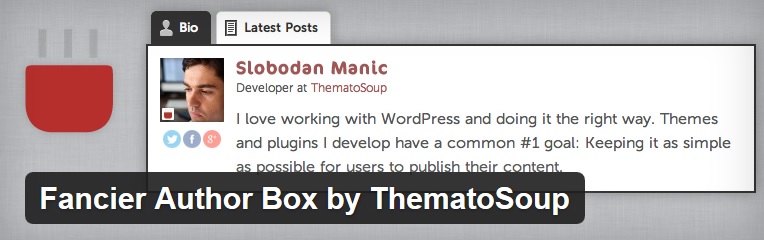
Just as the name says, it adds a pretty decent-looking author box to every post.
I've put mine at the bottom of each post.
Honestly, it's better suited to community-style blogs with lots of authors, but I'm using it just for fun.
Link: Fancier Author Box
5. Special Recent Posts - Show your latest posts

This is the plugin behind my home page and the pages you see when you click on each category.
There are countless plugins that do this, but this one just happens to suit my taste.
Out of the box, it can show the title, thumbnail, date, comment count, author, excerpt and more.
Like any plugin, it needs a bit of CSS tweaking.
Link: Special Recent Posts
6. UberMenu - A slick menu bar?!

I'm running a heavily modified version of Twenty Eleven, a theme that came out ages ago,
and its menu bar was really bare-bones.
For a while I just tweaked the CSS, until I stumbled on UberMenu, a plugin that's actually pretty popular.
The first time I saw it, I thought, "Is there anything this menu bar can't do?"
The only downside is that it's paid.
Link: UberMenu 3
7. WP Code Highlight - Post code without worrying!
It's not a plugin I use all that much, but it lets you display all kinds of code properly in your posts (MathJax being the exception, sadly).
Here's a quick example:
< ?php
  echo "Hello World!";
?>
Something like that. I haven't installed it yet, but Crayon Syntax Highlighter looks a lot better.
8. Final Tiles Grid Gallery - Build a tiled gallery
A plugin that makes it easy to create classic tiled galleries.
What sets it apart is that while most galleries line images up in vertical, horizontal or square grids, this one arranges them freely to fit each image. Like this:



I'm using it for the "Photos" tab on my "About" page.
Link: Final Tiles Grid Gallery
9. Contextual Related Posts - Related posts?
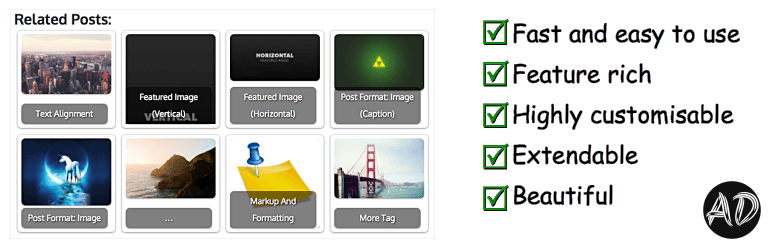
As the name suggests, it finds posts related to each post (on what basis, I'm not really sure) and lists them.
I've set it to show five at the very bottom of every post.
It mostly does bring up related posts, but every now and then it suggests something completely random.
Link: Contextual Related Posts
# Other plugins I use: Commentator, Contact Form 7, Display Exif, DMSGuestbook, Drop-Down Post List, FD Footnotes, Google XML Sitemaps, P3 (Plugin Performance Profiler), Quick Cache, Post Snippets, and more.
Helpful reads:
- 9 WordPress Plugins Recommended by Experts - Bloter (in Korean)
- The 10 Best WordPress Plugins - Web Actually (in Korean)
More in Blog Tips
See all- WordPress Plugin to Let Visitors Edit and Delete Their Own Comments (Editable Comments)(3)
- I Almost Fell for a Fake INIpay (INIP2P) Phishing Scam on Joonggonara(13)
- Useful WordPress Plugins: My Picks (Akismet, Jetpack and More)(6)
- Google Finally Overtakes Naver!(5)
- My Credit Card Saved in Google Wallet Got Hacked(9)
Comments 6
이런거 단점은 에러가 자주 뜬다는거;;;;;ㅋ브라우저에서 F12 누르면 "Failed to load" 20여개랑, Uncaught 어쩌구도 뜨고... warning 도 한개 =ㅇ=;;; 워드프레스도 너무 이런거 관리를 제대로 안해주는듯한...
뭐 플러그인 많이 사용하다 보니 서로간의 충돌도 좀 자주 일어나는 편이고 해서..orz 최대한 줄여야 되는데 쉽지가 않네요. 에러는 정말 좀 뜨네요 흑흑. 외관상 괜찮아 보이길래 방심하고 있었는데 해결 해봐야지..
sdf
저 세미나 장소의 칠판에 물칠 좀 하고 싶네요. ㅠㅠ
안녕하세요 질문하나드립니다.. 인터넷에서 비주얼 컴포저 '데모' 플러그인을 다운받아서 사용하고있는데요플러그인을 다운받을때 demo라는 글자가있어서 그런데 데모 플러그인은 그냥 그 플러그인 자체인가요? 아니면비주얼컴포저에서 몇가지 기능은 제외하고 테스트겸 사용자들한테 나눠주는건가요?
아무래도 demo이다 보니 기능이 좀 적겠죠~ 또는 기능은 똑같은데 demo라는 글자만 박아 놨을 수도 있습니다.