Ugh, 1366×768! When the Confirm Button Won't Fit on Your Laptop Screen
Translated from the Korean original. Read the original →
I just wasted a few hours doing something really silly.
I went to Mnet to pay for some songs, but I couldn't click the confirm button...
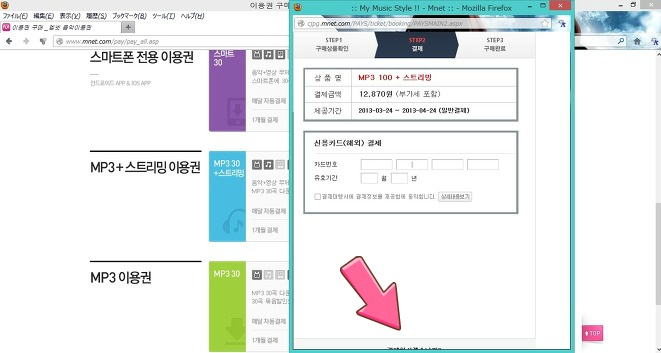
As you can see, my laptop has a wide screen, so the confirm button gets cut off at the bottom.
No scroll bar, the Tab key doesn't work, and trying it in Internet Explorer or Chrome doesn't help either...
Only after all that fumbling around did it finally occur to me to try changing the screen resolution. Facepalm.
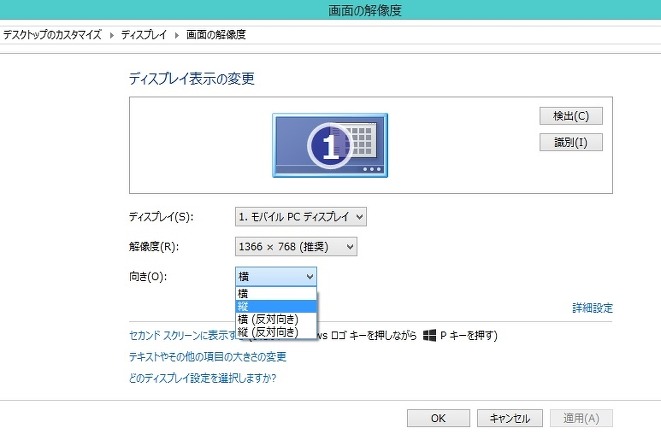
But no matter which resolution I picked, the confirm button still wouldn't show up...
Luckily, there was also a setting to change the screen orientation!
So I switched the screen to portrait, and...
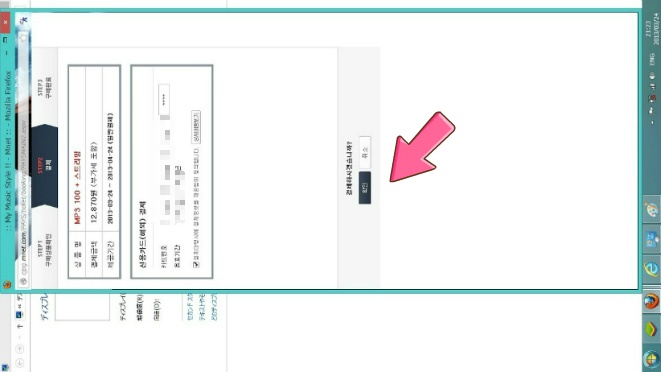
Ha, there it is at last: the confirm button.
The only problem was that the mouse didn't move the way I expected, so I ended up sitting more or less like this...

Comments 2
우리나라 사이트들이 종종 훳킹하다는 건 공공연한 비밀이죠.
일단 ActiveX 같은 찌끄레기를 쓴다는 시점에서...
나는 ActiveX가 싫어요 ㅠㅠ