How to Upload a Paper to arXiv: A Beginner's Guide
Translated from the Korean original. Read the original →

These days, a lot of researchers in math and physics post new results to arXiv first. When you send a paper to a journal, it usually takes anywhere from two months to several years before it's published, but if you upload it to arXiv, your results are out in the world the very next day. On top of that, it helps you establish priority for your work. Of course, plenty of researchers prefer not to post to arXiv until a reputable journal has accepted the paper, since there might be mistakes they haven't caught yet. Anyway, in this post I'd like to give a quick walkthrough of how to upload your results or papers to arXiv.
1. Creating an arXiv account
To upload a paper, you first need an arXiv account. Open the arXiv registration page and create one. Just fill in your email address, username, and password. Note that you can't use a username that's already taken. Once everything is filled in, click "Next." On the next page, enter your details, such as your real name (the name you usually publish under) and affiliation, and click "Next." The page after that asks for a verification code. By this point, arXiv will have sent an email to the address you entered, so just type in the code from that email. Click "Next" to submit the code, and your account is ready!
2. Preparing what you need to upload
(1) The manuscript
If you wrote your paper in \TeX, prepare the .tex file. In that case, you don't need any other files. When you upload the .tex file itself, arXiv compiles it and automatically generates DVI, PDF, and PS versions. You can also upload in DVI or PDF format, but I recommend submitting the .tex file so your paper can be read in as many environments as possible. arXiv supports almost every flavor of \TeX (\LaTeX, AMS-TeX, REVTeX, etc.), so there's not much to worry about. File names can only contain the characters a-z, A-Z, 0-9, and _+-.,= — so be careful not to use Korean characters or spaces!
(2) Abstract
arXiv requires an abstract with every upload, so have a summary of your paper or results ready ahead of time. The abstract is also key information when other people search arXiv, so it's a good idea to include the right keywords. The site used to be unable to render TeX in abstracts, but now that arXiv has added MathJax across the whole site, TeX commands display properly too.
3. Uploading (submitting)
Now that you're all set, let's upload! First, go to arxiv.org/user/login and log in with the username and password you registered earlier. You'll see a screen like this:
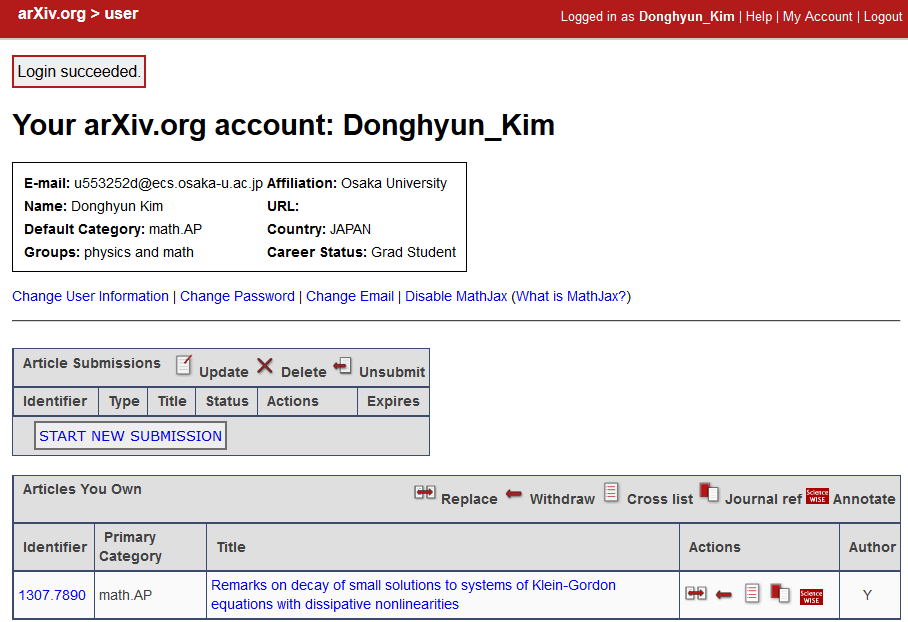
This page also shows information on the papers you've already uploaded. To upload a new paper, click "START NEW SUBMISSION" on this screen. You'll then see a series of options like the ones below.
(1) Verify Your Contact Information
Double-check your registration details, including your affiliation and email address. If nothing has changed, check "I certify that the above information is correct."
(2) Authorship
Choose whether you're the author of the paper or submitting it on someone else's behalf.
(3) License Statement
Choose which rights you grant arXiv when you upload your paper. If you're not sure about licenses, I recommend "arXiv.org perpetual, non-exclusive license to distribute this article." It gives arXiv only the minimum rights it needs to distribute your paper.
(4) Policy Statement
Read through arXiv's policies. If you're fine with them, check "I agree to the above policies."
(5) Archive and Subject Class
Choose the archive and subject class (field) for your submission. If you registered under the Math group, Mathematics is the only archive you can pick. To submit to a different group, you'll need to change your registration details. For the subject class, just pick the subfield that fits your paper best.
Once you've filled everything in, click "Continue." Now it's time to upload your paper. Click "Add files" and upload your paper's source files. In most cases, a single .tex file is all you need. (Don't worry about the file name; arXiv assigns its own name after you upload.) When the upload is done, click "Continue: Process Files." This is when arXiv compiles your .tex file. If the next page says "Submission processed OK," your upload worked! You can preview it under "View." If everything looks fine, click "Continue."
Next, enter the title and author(s). It's best to avoid TeX commands in the title whenever you can. For the author, enter your name in English, first name then last name. Use the name you normally publish under. If you've never published anywhere and this is your first arXiv upload, be careful here. There's a very good chance the name you enter now will be the one you use in academia for the rest of your career. (Switching later because you don't like it, say from "Donghyun Kim" to "Dong-hyun Kim" or "Dong Hyun Kim," causes a lot of confusion, especially for an author with papers out, so think it through and decide on your name before you commit!)
Then enter the abstract. Just copy and paste the one you prepared. Under Comments, the page count alone (e.g. "21 pages") is enough. In the MSC class field near the bottom, enter your classification from the AMS Mathematics Subject Classification. Leave the other fields blank and click "Save and Continue." If the paper has already been published, fill in the Journal-ref field before clicking. Finally, review your submission details, and if everything looks right, click "Submit."
And that's it! arXiv will send a confirmation email to the address you registered, so be sure to check it. After you upload, arXiv runs its own review, and it usually takes less than 24 hours for your paper to actually appear on the site.
Comments 10
오우 친절한 가이드!
컴퓨터 안 하고 딩굴거리던 사이에 많은 글이 올라왔네요. 저도 빨리 arXiv에 논문 투고할 날이 왔으면 좋겠네요. ㅎㅎ 근데 arXiv라고 이름을 참 잘 지은 거 같아요. 처음에 저 X를 그대로 읽어 아시브? 이랬던 게 기억나네요. ㅋㅋ
저는 현재도 가끔 그렇게 읽고 있습니다 OTL
아카이브 논문 투고는 이중 게재에 포함 되지 않나보군요.
네, 물론입니다. 하지만 저널 입장에선 반길만한 일이 아닌 건 사실이지요. 또 저널에 실리고 난 이후 arXiv에 올리는 경우는 본 적이 없네요.
안녕하세요 글 잘 보았습니다. 그런데 전 잘 안되더라구요~Endorsement needed for math.NT라고 하는데 제가 수학과를 나온게 아니라서 추천받을 상황도 아닌데..어떻게 해결 할 순 없을까요? 좀 알려주세요 감사드려요^^
아, 그런 부분이 있었군요. 조금 읽어봤더니 정수론(math.NT)의 경우 arXiv에 math.NT로 4편 이상 올린 사람으로부터 추천(endorsement)이 필요한가 보네요 후덜덜. 만약 학교에 소속되신 분이라면 교수들한테 말하면 쉽게 해결할 수 있을 듯 하고, 그렇지 않다면..
math.NT에 4편이상 올린 사람들의 연락처로 endorsement를 요구하는 메일을 대량 발송해 보는 것이 방법이겠지요. 어차피 저게 "장난글(?)" 등을 막기 위한 방편이라 왠만하면 해 줄 겁니다 ㅎㅎ
안녕하세요 질문있어서 이렇게 글 남깁니다. 논문을 투고 했거든요~ 그런데 Add a journal reference, DOI, or report number ~~라고 나오는데이건 뭘 의미 하는건지 모르겠어요 ~ 조금 알려주시면 감사하겠습니다. 감사해요^^
들러주셔서 감사합니다. 여기를 한 번 참고해 보세요. DOI는 저널에서 accept되신 후 저널측에서 통보해 줄 겁니다. accept 전이라면 DOI를 포함한 질문하신 모든 부분을 공란으로 두어야 겠지요.
arxiv 에 논문 투고하기가 의외로 까다롭던데요. 일단 enderson 조건을 만족해야 한다니.. 그래서 대안으로 vixra 에 올려보려고 생각중인데, 여론을 보니깐 거긴 오히려 신뢰도가 떨어진 것 같더군요. 흑, 도대체 어떡해야 할지..