How to Increase Blog Traffic: Basic Tips for Beginners
Translated from the Korean original. Read the original →
Unless you're using your blog purely as a "personal diary," you're probably pretty interested in traffic (visitors, incoming clicks). So this time I want to go over the things I've tried so far to grow my blog's traffic, based on my own experience. I'm still a beginner at all this myself, so I won't get into anything advanced. These are just the absolute basics everyone should cover.
1. SEO (Search Engine Optimization)

I'm still learning about this one myself, through sites like www.zinicap.kr, so I'll skip it here. Besides, there's a rumor that if you go around spilling the details of Naver's search ranking algorithm, Naver will punish you, for example by blocking your blog from its search results.
2. Submit your RSS feed to Korean search sites
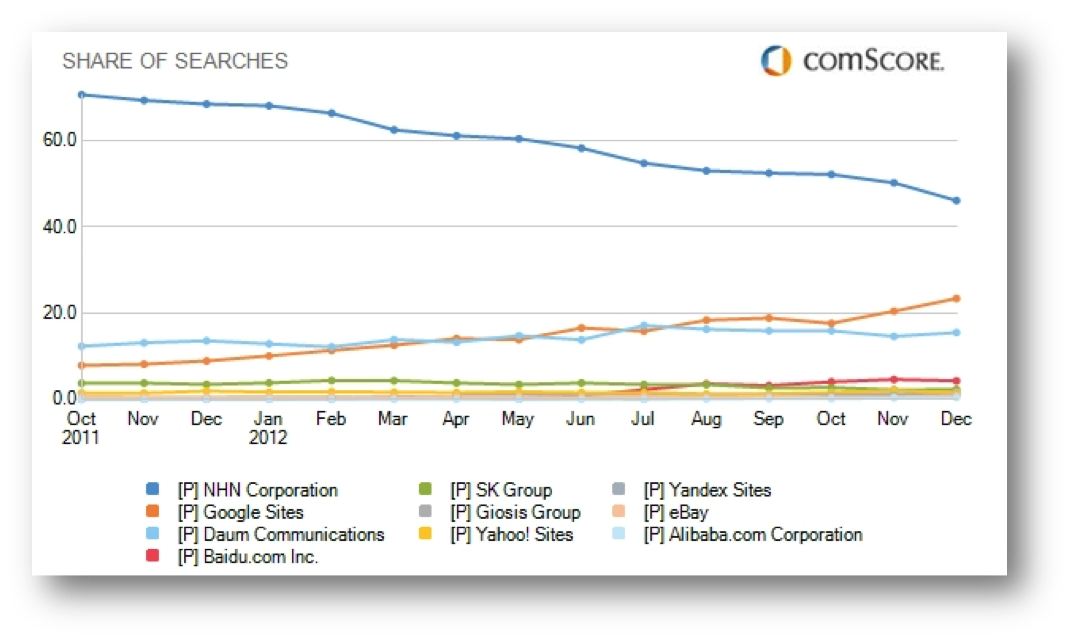
As the comScore numbers above show, the Korean search market is pretty much split between just two sites, Naver and Daum, so submitting your RSS feed to those two is enough.
One catch: these sites only include posts written after your feed submission was approved. By default your feed only shows your 10 most recent posts, so anything older than that obviously won't show up in search. The fix is simple: once your feed is approved, publish every post on your blog in the RSS feed, and after a while they'll all show up in Korean search engines automatically. Once they've been picked up, you can switch the feed back to the latest 10 posts.
3. Get listed on international search engines (Google, Bing, Yahoo)
(1) Google
With Google, simply adding your site is enough to get it into the search results. Better yet, you should also submit a sitemap through Google Webmaster Tools. In Japan, yahoo.co.jp dominates the search market, but its results are basically just Google's (google.co.jp) results passed through, so submitting a sitemap to Google covers Japan too.
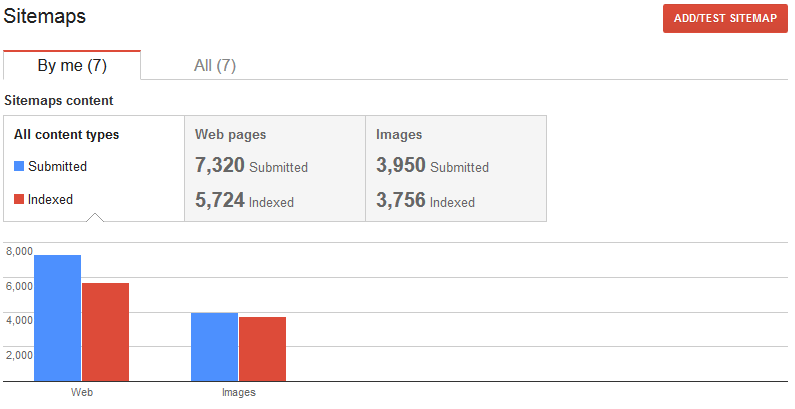
This blog's sitemap, successfully submitted in Google Webmaster Tools
(2) Bing
You should also submit your sitemap to Bing through Bing Webmaster Tools. Once you submit it to Bing, your site automatically shows up in Yahoo.com's search results as well. It brings in far less traffic than Google, of course, but it creates plenty of inbound links for very little effort, so I'd recommend it.
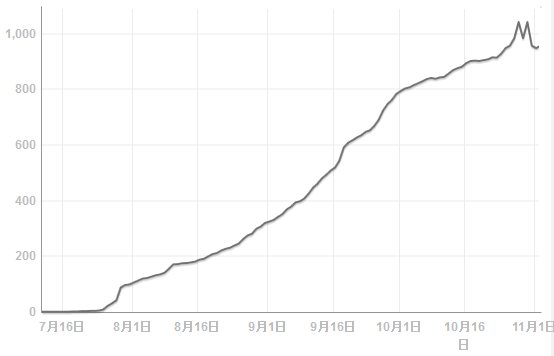
This blog's indexing status in Bing Webmaster Tools
4. Share and post on social networks
Because of what a blog is, it's not like your personal info or other things you want to keep private: "the more your blog links show up around the web, the better." With Google in particular, the more inbound links you have (the number of times other sites link to your blog), the higher your Google PageRank goes, and that ends up affecting where you rank in Google search. I've also heard that Google takes into account how many times a post has been shared on Google+.
Right now I've made a habit of sharing to social networks like this:
Facebook Page: almost every blog post
Twitter account: links to almost every blog post
Google+ account: almost every blog post, with a thumbnail and summary
Tumblr account: mostly photos, with a link back to the blog.
When you share on social networks, it's a good idea to add #hashtags while you're at it. In my experience it doesn't come close to organic search traffic, but it did bring in some extra visitors. And if you've got a strong presence on social media (on Twitter or Facebook, say, lots of followers), you can expect a decent amount of traffic every time you publish a new post.
5. Build inbound links by actively sending trackbacks
Most blogs give each post its own trackback URL. Say you've written a post about Jindo dogs. Before publishing it, search for "진돗개" (Jindo dog) on Naver or wherever, send trackbacks to the blogs near the top of the results, and you can expect some visitors to come over from there. On top of that, every trackback adds another inbound link, so you kill two birds with one stone.
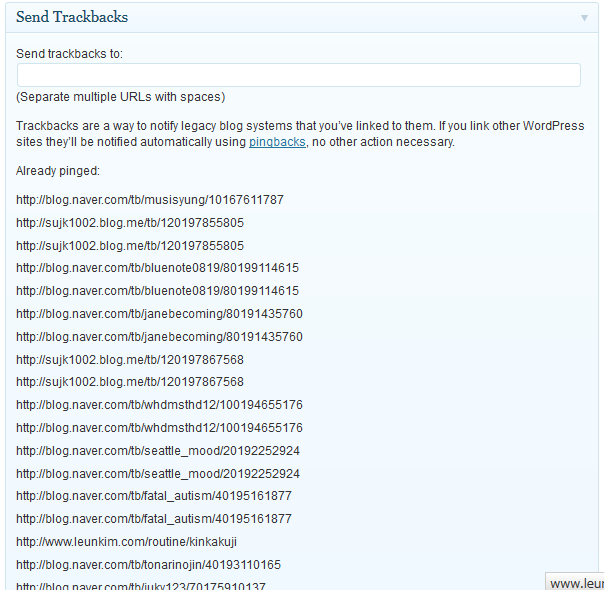
Sending trackbacks while writing a post on this blog
6. Add alt text to your images
When you upload images to a post,
<img alt="Kimchi Food South Korea" src="http://..."/>
you need to add an alt attribute like this so that Google and other search engines can find your images. These days lots of people search on Google, switch to the Images tab, and click on whatever picture catches their eye. So even though it's a bit of a hassle, make sure to put alt text in your image tags, and a description too if you have time.
Comments 5
하하.. 네이버는 검색부문에서 악명이 높죠. 저 네이버와 관련된 소문은 진실이라고 하더군요. 그런 글들이 많이 올라오면 메일 한통이 온다고 하더라고요…. 그리고 네이버는 너무 폐쇄적인 포털 형태, 즉 사용자들을 계속 가둬두기 위해 검색을 해도 결과의 80%는 자사의 블로그, 지식iN, 카페 서비스 등으로 보여주죠. 그래도 사용자들의 가둬두기 위한 것 중 하나인 웹툰은 좋더라고요. :)
네, 뭐 사실 말이 좀 이상할 지 몰라도 네이버의 진정한 힘은 그 "폐쇄성"과 "사용자 길들이기"에 있다고 해도 과언이 아니지요. 네이버가 만약 갑자기 구글처럼 변신하면, 사용자들은 더이상 네이버를 사용할 필요가 없어지니까요 ㅎㅎ. 뭐 많은 분들이 그러시겠지만 저도 네이버 검색은 "네이버에서는 분명히 있을 법한" 하지만 "구글에선 찾기 어려운" 것들을 검색하기 위해 씁니다. 뭐 결국 네이버는 개방해도 폐쇄해도 개인적으로 현 상황을 타파하는건 힘들어 보입니다..
혹시 모르죠.. 말도 안되는(?) 법안 제정(예를 들면, 중국 정부식의 해외 사이트차단)으로 인해 네이버의 수명이 연장될지는...
안녕하세요트랙백에 대해서 설명 좀더부탁드립니다.현재 구글 블로그를 사용중인데요,,, 트랙백을 어떻게 보내는지 설명부탁드려요..
흠.. 트랙백이라면 그냥 원하시는 트랙백 주소를 구글 블로그 포스트 작성시 "트랙백 보내기" 등의 메뉴에 입력하시면 될 것 같습니다.
안녕하세요 글로벌 비즈니스 에이전시, 엑셀시어 파트너스입니다.블로그, 웹사이트, 게시판 등 방문자가 필요한 곳이면 어디든지 트래픽을 제공해드립니다.저렴한 가격에 방문자를 관리해 손쉽게 검색 랭킹과 신뢰도를 높여보세요~~!!- 포털 블로그- 각종 웹사이트, 게시판, 커뮤니티자유롭게 유입 URL (리퍼러) 설정이 가능합니다.구매시 원하는 주소를 말씀해주시면 해당 주소에서 방문자가 오는것처럼 만들어 드립니다.넉넉한 보너스 제공은 기본이며 주문량이 많거나 장기 거래시 더 많은 혜택을 드립니다.작업 완료후 간략히 방문자 통계를 확인하실 수 있는 주소 보내드립니다.결제후 메세지로 작업을 원하는 블로그, 사이트 등의 주소만 알려주시면 됩니다.방문자의 국적/성별/연령 등은 모두 랜덤이며 특정 조건으로의 필터링은 불가능합니다.방문자들은 당연히 모두 서로 다른 IP를 사용하며 봇에서 발생시키는 기계적인 트래픽이 아닙니다.속도는 시간당 최대 200~300뷰 정도까지 가능하며 평균 하루에 5,000뷰 정도까지 보내드릴 수 있습니다.여러 주소로 분할 작업 가능합니다. 텔레그램: @wgbagency위챗: wgbagency