Pingdom Tools: Testing My Blog's Loading Speed
Translated from the Korean original. Read the original →
I ran a speed test on my blog with Pingdom Tools, which I've been using for a while now. It's a free speed test site, and if you pay for it, you also get a feature that checks your site's speed every hour from locations around the world.
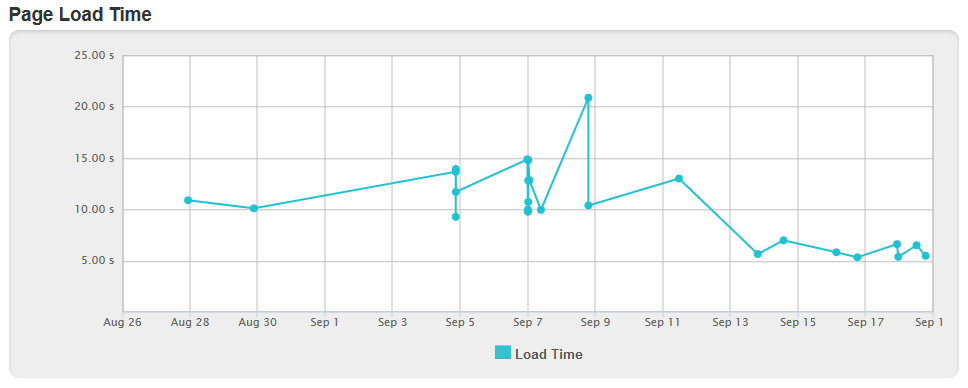
You can see that the main page started loading faster from September 13. Sure enough, the biggest reason it had slowed down was that the main page was loading a huge number of photos.
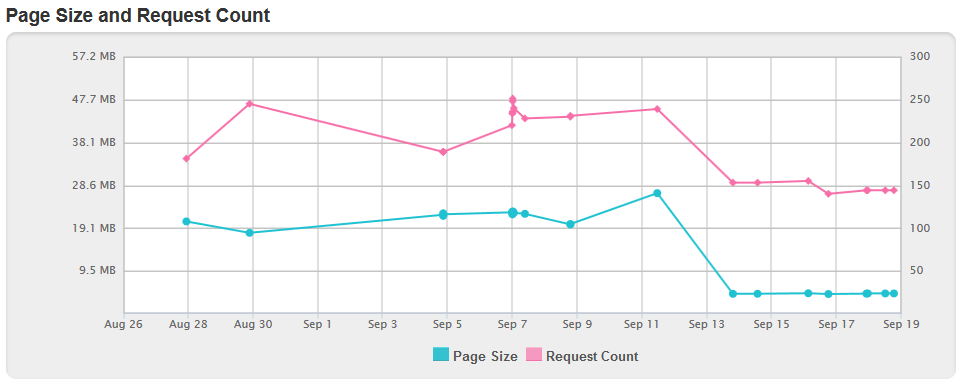
So I redesigned the main page. Turns out it used to weigh in at a whopping 20MB. Compare that with Naver (Korea's biggest portal) at 1.0MB and Google at 370KB, and, well... On top of that, moving my server to HostGator, loading fonts through the Google Web Fonts API, cutting unnecessary CSS, setting up QuickCache, and getting rid of a lot of plugins all seem to have helped a bit too. Still, if most of your visitors are in East Asia, nothing beats a server from a company in East Asia (though access from the US or Europe might get quite a bit slower). Either way, unless you own the server, you can't change how fast it is, so I'll just keep working to squeeze as much speed out of it as I can.
More in Blog Tips
See all- The Ups and Downs of My Tistory Blog: Visitor Stats Over Three Years(6)
- Signing Up for Google AdSense: Pros and Cons of Putting Ads on My Blog(2)
- Pingdom Tools: Testing My Blog's Loading Speed
- How to Get Your Blog Listed on Naver – Submitting Your RSS Feed to Korean Search Engines
- How to Add Math Equations to a Blog: Images vs. MathJax vs. QuickLaTeX(10)
Comments 0