How to Add Math Equations to a Blog: Images vs. MathJax vs. QuickLaTeX
Translated from the Korean original. Read the original →
If your blog covers natural science or engineering, sooner or later you'll need to put equations in your posts. Here I'll go over a few ways to do that and give my own take on the pros and cons of each.
1. Uploading images directly
This is the most old-school method, and also a very reliable one. As long as the server hosting the images stays intact, your equations won't break, and it's probably the fastest to load as well. The biggest drawback, though, is that it's a real hassle. You have to write the equation beforehand, save it as an image, upload it to the server, and then insert it into the post every single time. Images are also usually harder to line up with the surrounding text than text itself. Some well-known sites that turn \TeX equations into images are:
and others like them.
2. MathJax
 This was my go-to method back when I blogged on Tistory. The biggest advantage of MathJax is how convenient it is. There's none of the tedious work from method 1. When writing a post, you just type something like
DD\int_a^b \frac{\sin x \cos x}{e^x x^3 \log x}\,dxDD
(where D = dollar sign),
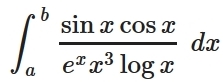 and it gets rendered like this. Naturally, no equation images are stored on your own server; every time someone loads a post with equations, MathJax renders them on the fly. There's also very little risk of losing your equations. As long as MathJax doesn't go out of business and your posts themselves stay intact, the equations will keep rendering. On top of that, it works anywhere on the blog, including comments and the guestbook.
The downside is that some web browsers take a long time to render, or don't support it at all. That's because the output isn't an image. Take IE8, which is still a fairly recent browser: rendering takes practically forever. (I remember being shocked when I opened my own site on a school computer.)
And since more and more people visit from mobile devices (smartphones, iPads and so on), I'm not sure MathJax will render reliably on those, either.
3. QuickLaTeX
 This is what I'm using right now. Put simply, QuickLaTeX is a plugin that fixes the weaknesses of both method 1 and method 2. When you write a post, QuickLaTeX takes ordinary \TeX syntax, exactly like MathJax. The output, however, is an image of the equation, just like in method 1. And unlike most images, it positions and aligns them very neatly. For example, if you type
I hope to prove if D a>1 D then
DD \int_a^b\frac{\sin x\cos x}{e^x x^3\log x}\,dx=\cdots DD
QuickLaTeX renders it as
I hope to prove if a>1 then
Since the final output is an image, it isn't held back by browser or mobile device limitations. And just like method 2, the equations keep rendering as long as the company stays in business, so it's a pretty safe option. Even if the company did shut down, you could simply add MathJax or something similar to your blog without touching your posts. So methods 2 and 3 are actually even less likely than method 1 to lose your equations. QuickLaTeX also supports the powerful tikz syntax for drawing images. And of course, QuickLaTeX also renders equations anywhere on the blog, including comments and the guestbook.
Putting it all together, here's how they compare.
Performance Comparison
| Method | Simplicity | Compatibility | Speed | Robustness | Beauty | |
| 1 | Direct Upload | Poor | Excellent | Excellent | Good | Good |
| 2 | MathJax | Excellent | Normal | Normal | Excellent | Excellent |
| 3 | QuickLaTeX | Excellent | Excellent | Good | Excellent | Good |
More in Blog Tips
See all- Pingdom Tools: Testing My Blog's Loading Speed
- How to Get Your Blog Listed on Naver – Submitting Your RSS Feed to Korean Search Engines
- How to Add Math Equations to a Blog: Images vs. MathJax vs. QuickLaTeX(10)
- [Plugin] Adding QuickLaTeX to My Blog (TikZ Graphs and Diagrams)(2)
- How to Migrate a Blog from Tistory to WordPress (TTXML Importer)(3)
Comments 10
음... 9월부터 TeX 알바를 시작해서 거기서 번 돈으로 계정을 하나 팔까 계속 고민중이네요 ㅋㅋ
오오 알바 축하드립니다. 저도 그런 알바 해 봤으면 좋겠네요 ㅎㅎ 서버는 만약 사려면 역시 속도가 빠른게 좋은 것 같네요. 제가 질러버린 godaddy는 싼 맛에 지르긴 했지만 아시아 서버가 싱가폴에 있어서 그런지 일본에서 접속이 상당히 느리네요 OTL.
한국에서도 느려서 ㅠㅠ
전 한국 계정으로 할려고 합니다 :)
그렇죠..흑흑 저도 서버만 바꾸고 싶은 욕구가 강하게 드는데 이미 질러 버려서 귀찮기도 하고 ㅠㅠ
1년기준으로 3만원에 계정용량 2GB, 트래픽 3GB 서비스가 있더군요.
이걸로 할까 고민중입니다. 당연히 계정 하나 만들고...
홈페이지, 워드프레스 이원화 방식으로 해볼까 생각중이네요. 가능한 구성인지는 모르겠는데...
자료 올리는 홈페이지 따로...
허허 가격 치고는 용량이랑 트래픽이 좀 작네요. 뭐 저같이 사진이나 영상 다량으로 업로드 하는 유저는 꿈도 못꾸는 용량이군요! ㅎㅎ
이거 덧글 기능이 약간은 흉하긴 하네요.
워드프레스 이전은 아마도 2학기 끝나고 해야할듯 하네요.
아직 자료가 빈약해서...
2학기때 고급선형대수, 해석학1(연세대), 미분방정식 을 들을거 같아서.
(무려 고급선형대수에서는 말로만 들었던 Lie Algebra를 한다고.....)
그때쯤이면 빈곤한 블로그에 자료가 더 추가되지 않을까....
아 무료계정을 하나 찾았네요.
조건 괜찮네요 :)
hostinger.kr
우선 개설해놓고 경과를 지켜보기로 :)
아 그렇군요 ㅎㅎ. 역시 용량과 트래픽 무한대에 속도까지 빠른건 좀 비싼 것 같군요 OTL. 아, 그리고 댓글기능 등은 워드프레스가 자유도만큼은 최상이기 때문에 당연히 입맛대로 고칠 수 있습니다 :) 방금 잠깐 대구에 왔는데, 여기서 접속해보니 일본보다도 훨씬 느리네요 읔...ㅠㅠ
유료계정으로 갈아탔습니다!
주소는 mathskykite.com입니다!