How to Get Your Blog Listed on Naver – Submitting Your RSS Feed to Korean Search Engines
Translated from the Korean original. Read the original →
So you've set up a self-hosted blog like WordPress, and it's starting to find its feet. What's next? Submitting your RSS feed to the search engines. That's what gets your posts showing up when people search for keywords on those sites. Of course, your blog needs to be publishing a working RSS feed first. Google, thankfully, makes it easy: one click at https://search.google.com/search-console/about and you're registered. I already use Google Webmaster Tools, so I didn't have to do anything extra.
Korean search engines are a different story. They're very closed off (honestly, I could complain about Naver all day, but if you want to survive, you have to play by the rules of the biggest player), so you have to contact the search engine yourself and go through a review. (With the Tistory blog I used to run, posts just naturally showed up on Naver and elsewhere without any review.)

Let's start with how to submit your RSS feed to Naver. If you have a good number of posts in Korean, getting picked up by Naver, which completely dominates the search market in South Korea, is a must for any blogger. In my case, it took about a month and a half before Naver finally let me in.
First, click the link below, go to "문의하기" (Contact Us), and send Naver a request with a title like "RSS feed registration request."
They'll reply by email. Ideally they'd tell you right away that your blog has been added to the search results, but that often isn't the case. The reasons vary a lot: "the review is taking a long time," "not enough posts," "too much copied content," "copyright violations," "promotional blog," and so on. Over the course of a month, I sent a total of five requests and got turned down every single time.
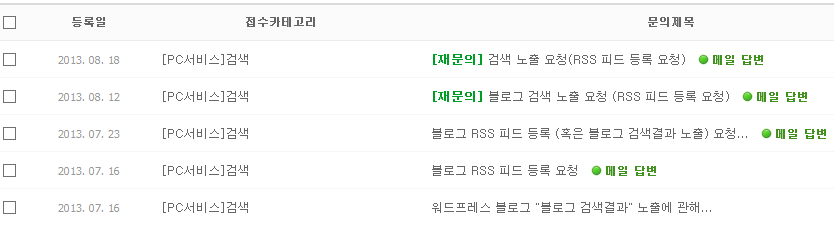
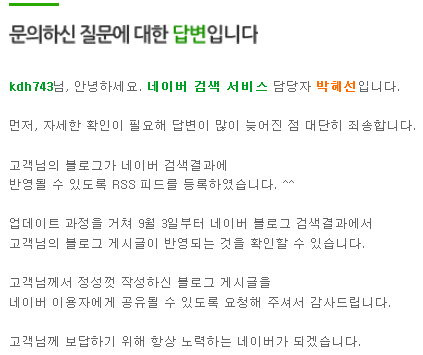
They never told me why. All I got was the same canned reply, over and over, saying it was still under review. I'm sure Naver has its own strict internal review rules, but I never imagined it would take this long. Then I came across a post by another blogger saying something like, "I called them, and they registered it right away." So I picked up the phone and called 1588-3820 too. After pressing a few buttons I got through to an agent. We talked for about five minutes, just my blog address and contact info, and they said they'd get back to me within a week. About three days after that call, I got the reply below from Naver.
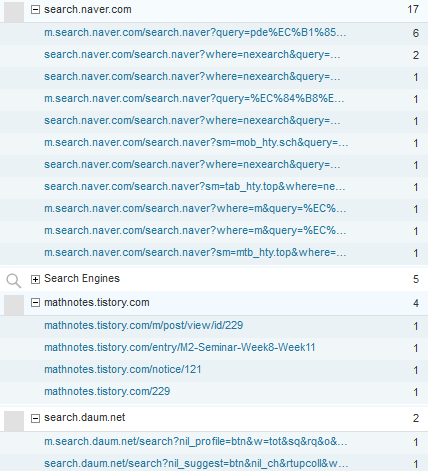
Calling really is the way to go! And sure enough, as you can see below, traffic from Naver slowly started trickling in.
 The second-biggest search engine in South Korea is Daum. It's a distant second, but it's still worth registering there too. Daum is generally much easier than Naver when it comes to adding your RSS feed. Go to the link below,
http://cs.daum.net/mail/form/15.html
choose "블로그, 카페 검색 문의 - 내 블로그 검색(RSS) 문의" (Blog/Cafe search inquiries - My blog search (RSS)), send your request, and your RSS feed should be registered within a few days.
More in Blog Tips
See all- Signing Up for Google AdSense: Pros and Cons of Putting Ads on My Blog(2)
- Pingdom Tools: Testing My Blog's Loading Speed
- How to Get Your Blog Listed on Naver – Submitting Your RSS Feed to Korean Search Engines
- How to Add Math Equations to a Blog: Images vs. MathJax vs. QuickLaTeX(10)
- [Plugin] Adding QuickLaTeX to My Blog (TikZ Graphs and Diagrams)(2)
Comments 0